
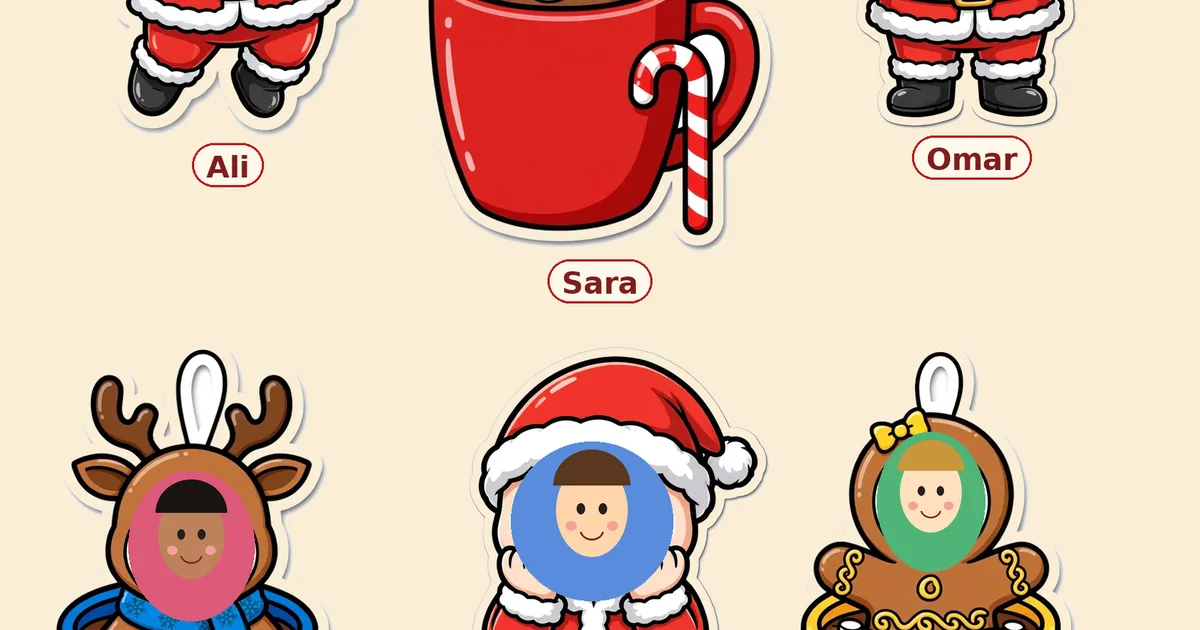
The quick version: the board every class wants — each student’s face inside a cute Santa design, name underneath, all under one big holiday headline — no longer needs a purchased printable kit, a PowerPoint licence or an evening of resizing photos one by one. Our free Christmas Photo Board Maker does it in the browser: add a character per student, pick from 11 Santa and cocoa-mug designs, drop in the photo, type the name, and download one big print-ready PNG of the whole board.
Why the photo board beats every other December display
Ask teachers which board their class loved most and the photo board wins by a mile, for one simple reason: the children are in it. A generic “Merry Christmas” display is wallpaper; a wall of Santas with your students’ own faces is a destination — kids bring friends from other classes to see it, parents photograph it at pickup, and it quietly does real community work in the last hectic weeks of term. The name under each face matters too: for younger children it is genuine name-recognition practice wearing a Santa hat.
The old way, honestly priced
The traditional route is a paid bulletin-board kit (typically a PDF plus an editable PowerPoint), then: print the pieces, open the PowerPoint, insert each photo, drag it into the hat template, type each name, export or print page by page, cut, assemble. It works — teachers have done it for years — but the honest cost is the kit price plus one long evening, and the result lives in a file format nobody wants to edit twice. If you add a student in week two, you start the file fight again.
The browser way, step by step
Open the Photo Board Maker and use a Quick Start button (Class of 12, Class of 24) to lay out empty characters, or add them one at a time. For each student: choose a design — six Santa poses, or the cocoa-mug set (Santa, snowman, gingerbread, reindeer, penguin) for a hot-chocolate theme — upload the photo, and nudge the zoom and position sliders until the face sits perfectly. Type the name; it appears on a name plate under the design. Set the board title and your class name on the second line, then download. One PNG, the whole board, done before your coffee cools.
Headline ideas that teachers actually use
Keep it short and big: Happy Holidays and Merry Christmas never miss. Warm and bookish: “Warm Up With a Good Book”. Kindness themes: “A Little Cup of Kindness” (perfect with the cocoa-mug designs). Playful: “Santa’s Little Helpers”, “Our Class Is Snow Much Fun”, “Frosty’s Friends”. Put your class name on the second line — “Mrs. Ahmed’s Class”, “Room 4” — so the board still reads from down the corridor.
Printing tips for a board that looks bought
The download is a wide, high-resolution PNG (1600 pixels across before print scaling). For a wall board, print it as a poster across several sheets (most school printers offer a poster/tile option) or send it to a print shop as one A2/A1 sheet — the line art and bold colours are forgiving at large sizes. For a door or a smaller display, a single A3 sheet keeps every face readable up to about 24 students; beyond that, poster printing keeps faces generous. Laminate if the board will live in a corridor — December humidity is unkind to paper.
A word on privacy, because these are children’s photos
The maker runs entirely in your browser: photos are never uploaded, stored or sent to any server, and there is no account. That is the right default for student images — but still follow your school’s photo policy before printing or sharing the board beyond the classroom, exactly as you would with any class photo.
Make yours: the Christmas Photo Board Maker — free, no sign-up, works on the school laptop or your phone. Families are welcome too: the same maker builds a family board, and the single-character download makes a transparent Santa cutout of each child for cards and gift tags.
Frequently asked questions
Do I need PowerPoint or a purchased kit for a student photo board?
Not with the online maker. The traditional kits are PDF + PowerPoint products you assemble by hand; the browser maker places each photo and name automatically and exports the finished board as one PNG — free, with nothing to install.
How many students can one board hold?
Up to 30 characters per board. The layout arranges them in rows automatically and the board grows taller as you add more, keeping faces a good size for printing.
Are student photos uploaded to a server?
No. The maker works entirely in your browser on your device; photos are never uploaded or stored anywhere. You should still follow your school's photo policy for printing and sharing, as with any class photo.
What size should I print the board?
The PNG is 1600 pixels wide. Print as a tiled poster or one A2/A1 sheet for a full wall board; a single A3 sheet suits up to roughly 24 students. Bold colours and thick outlines scale cleanly.