
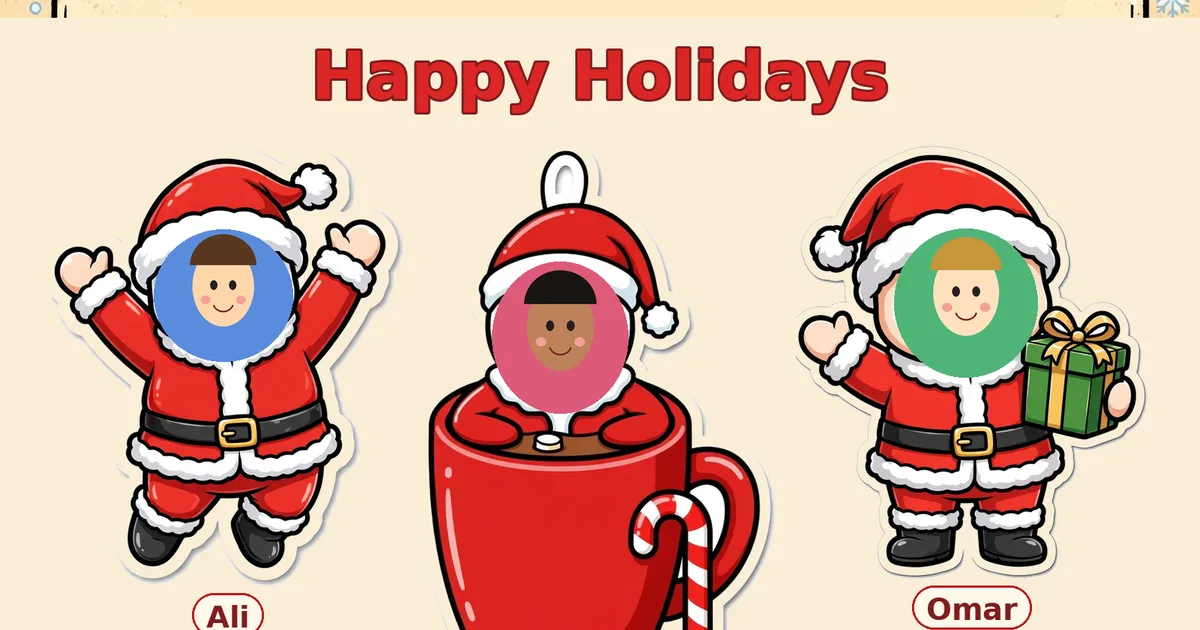
One board for one child — or the whole class
Every December, teachers buy printable bulletin-board kits, then spend an evening in PowerPoint pasting student photos into Santa hats one at a time. Parents hit a different wall: the “put your face in Santa” apps want installs, accounts or AI credits. This maker is the simple version of both jobs. Add a character, choose from 11 original designs — six Santa poses and five cocoa-mug friends (Santa, snowman, gingerbread, reindeer and penguin) — upload a photo, type a name, and the face lands in the design. Add one child, two, a family of five, or thirty students: the board arranges itself on a festive classroom backdrop with a garland, a Christmas tree and a cosy snow-covered house, ready to download as one big print-quality PNG.
Made for classroom walls — and family fridges
Teachers: build the class board once, print it for the wall, and share the same PNG in the class group chat — every student finds their own Santa. The board title takes your headline (“Happy Holidays”, “Merry Christmas”) and the second line takes your class name. Parents: the single-character download gives you one transparent Santa cutout per child — ideal for Christmas cards, gift tags, stickers and WhatsApp forwards. Faces are framed with zoom and position sliders, so a photo that is slightly off-centre still sits perfectly.
Your photos never leave your device
This is worth saying plainly, because the board is usually full of children's faces: everything runs in your browser. Photos are not uploaded, not stored and not sent anywhere — there is no account and no server copy. Close the tab and the board is gone; download the PNG first if you want to keep it. For more December classroom fun, pair the board with our Christmas Party Games and the Christmas Card Maker, and read the guide: Christmas Bulletin Board With Student Photos.
Frequently asked questions
How do I put my child's face in Santa?
Add a character, pick a Santa or cocoa-mug design, upload a photo and type the name. The photo lands in the character's face spot automatically — use the zoom and move sliders to frame it perfectly, then download the board as a PNG.
Can I make a board for my whole class?
Yes — that is what it is built for. Add up to 30 characters, one per student, each with their own photo, name and design. The board grows and arranges itself; download one big PNG and print it for your classroom wall, or share it digitally.
Are our photos uploaded anywhere?
No. Everything happens in your browser on your own device — photos are never uploaded, stored or sent anywhere. Close the tab and they are gone.
Can I make just one Santa photo?
Yes. With a single character you can download the whole board, or use the 'Download this character only' button for a transparent PNG of just that Santa — perfect for cards, stickers and WhatsApp.
What photo works best?
A clear, front-facing photo with the face well lit and not too far away. The zoom and position sliders fix most framing; a head-and-shoulders shot fills the face spot best.